
Course Registration Override Request Process (Students)
Follow the steps below to submit your course registration override requests.
- Log in to ESTHER using your Rice NetID and password. (Duo two-factor authentication is required.)
- From the Students tab, click Students – Registration, then select the Course Registration Overrides tile.
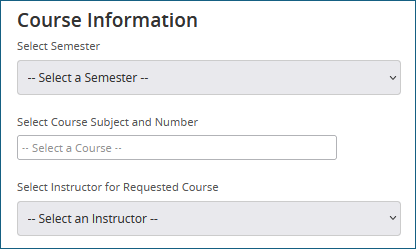
- Select the Semester, enter the Course Subject and Number (or CRN), and select the Instructor.
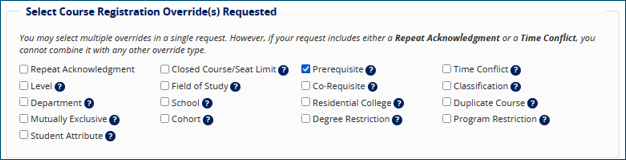
- Check the box(es) for the override(s) type(s) you are requesting.*
- Choose Yes or No to indicate whether you consent to share your Academic History (Transcript) with the reviewing instructor.

- Enter a detailed explanation for your request in the Justification text box.
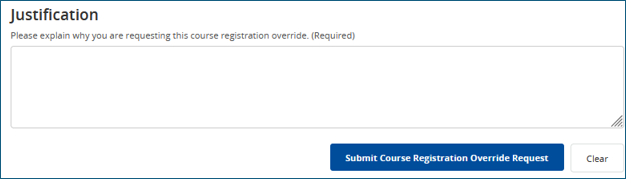
- Click Submit Course Registration Override Request.
- Verify Submission: The system will display a “Request Successfully Submitted” notification to confirm successful submission and then the page will clear to allow for another submission. You can submit an additional request or safely close the window if you are done. If there is an error with your submission, the system will display an error message in red.

- Monitor your Rice email for automated status updates. If approved, return to ESTHER to complete your course registration.
*You may select multiple overrides in a single request. However, if your request includes either a Repeat Acknowledgment or a Time Conflict, you cannot combine it with any other override type.
Common Registration Errors
For more information on Common Registration Errors, please review Common Registration Errors.
Frequently Asked Questions (FAQs)
-
How long does it take for an override request to be reviewed?
-
Repeat Acknowledgment overrides are immediately processed. For other course registration overrides, processing times are dependent on instructor review and approval. High volume during peak registration times may cause slight delays.
-
What should I do if my request is denied?
-
Review the instructor's comments in the decision notification email for specific details. If you have further questions, you can reach out directly to the instructor or your academic advisor.
-
Does receiving an approved override automatically register me for the course?
-
No. An approved override grants you permission to register, but you must still log in to ESTHER and officially add the class to your schedule.
-
Can I submit multiple override requests for different courses?
-
Yes, you can submit separate requests for each course requiring an override.